PX Insights
#Getting Started
This guide provides a step-by-step walkthrough to help you send your reviews using the PX Insights API. By the end, you’ll have successfully authenticated and triggered the synchronization of your reviews.
#Prerequisites
Before proceeding, make sure you have either a Custom App or a standard Connection to an Akeneo PIM.
To learn how to create a connection, refer to the Authentication Guide. If you're setting up a custom App, follow this tutorial to obtain an App token.
#Using Postman
The easiest way to explore the PX Insights API is via our Postman Collection.
#1. Import the Postman Collection
- Download the Postman Collection
- Download the Postman environment template
- Import both files into Postman (see this guide if needed)
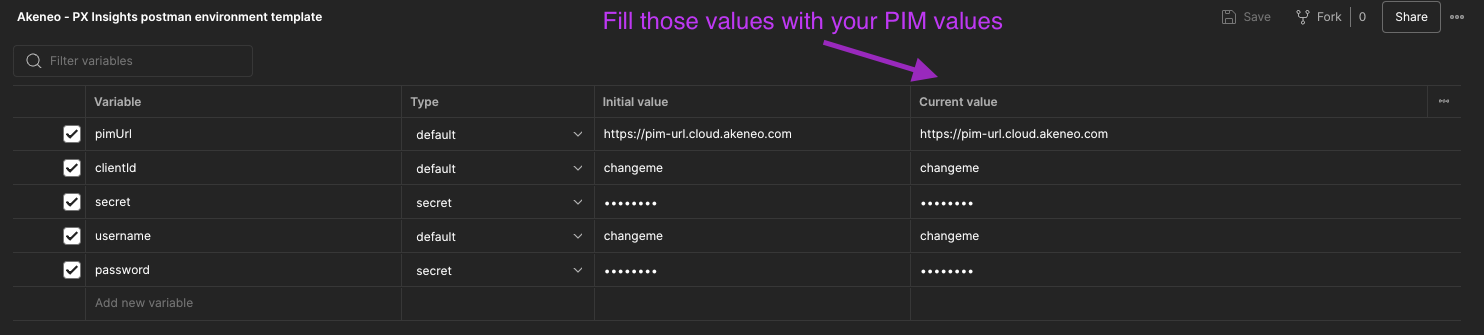
#2. Configure the environment
The collection includes a built-in script to handle authentication when using a PIM connection.
Fill in the environment variables with your PIM connection credentials — if valid, the script will automatically generate an access_token.
#3. Trigger the synchronization of your reviews
- Select your Postman environment
- Use the
Ingest reviews data asynchronouslyrequest - Paste your review payload and send it
#Using Curl
#1. Set up authentication
This example uses a PIM connection to authenticate and retrieve an API token.
Set environment variables:
export CLIENT_ID="your-client-id"
    export CLIENT_SECRET="your-client-secret"
    export API_USERNAME="your-API-username"
    export API_PASSWORD="your-API-password"
    export TARGET_PIM_URL="https://your-pim.cloud.akeneo.com"
Replace the placeholders with your actual credentials and host URL.
Encode the Client ID and Secret in base64 format, separated by a colon ::
export BASE64_ENCODED_CLIENTID_AND_SECRET=$(echo -n "$CLIENT_ID:$CLIENT_SECRET" | base64 -w 0)
    # For Mac users, remove the -w 0 option
Get your API token:
 curl --request POST "$TARGET_PIM_URL/api/oauth/v1/token" \
      --header "Content-Type: application/json" \
      --header "Authorization: Basic $BASE64_ENCODED_CLIENTID_AND_SECRET" \
      --data-raw '{
        "grant_type": "password",
        "username": "'"$API_USERNAME"'",
        "password": "'"$API_PASSWORD"'"
      }'
Store the access_token from the response:
export PIM_API_TOKEN="..." # Replace with the actual token
ℹ️ Tokens are valid for one hour.
🛠 You may also use a custom App. As long as you have a valid client_id and API token, you're good to go.
#2. Trigger the synchronization of your reviews
From here, we'll use the PX Insights REST API at: https://px-insights.app.akeneo.cloud/api/v1
🛠 For all requests to the PX Insights API, you must include these headers: X-PIM-URL, X-PIM-TOKEN, and X-PIM-CLIENT-ID.
Asynchronous mode (recommended)
This is the standard production-safe endpoint:
curl --request POST 'https://px-insights.app.akeneo.cloud/api/v1/reviews/ingest/async' \
     --header "X-PIM-URL: $TARGET_PIM_URL" \
     --header "X-PIM-TOKEN: $PIM_API_TOKEN" \
     --header "X-PIM-CLIENT-ID: $CLIENT_ID" \
     --header 'Content-Type: application/json' \
     --data-raw '{
      "sync_id": "1a2b6453-45d0-4892-b3f6-836c2d2be758",
      "review": {
        "product_identification": {
          "origin": "Yotpo",
          "metadata": {
            "sku": "product-123"
          }
        },
        "raw_reviews": [
          {
            "external_id": "review-001",
            "score": 5,
            "title": "Excellent product!",
            "text": "This product exceeded my expectations. The quality is outstanding and it works perfectly."
          },
          {
            "external_id": "review-002",
            "score": 3,
            "title": "Good but could be better",
            "text": "The product is good overall, but I had some issues with the packaging."
          }
        ]
      }
    }'
Synchronous mode (development only)
For troubleshooting and debugging during development, you can use the synchronous endpoint:
curl --request POST 'https://px-insights.app.akeneo.cloud/api/v1/reviews/ingest/' \
     --header "X-PIM-URL: $TARGET_PIM_URL" \
     --header "X-PIM-TOKEN: $PIM_API_TOKEN" \
     --header "X-PIM-CLIENT-ID: $CLIENT_ID" \
     --header 'Content-Type: application/json' \
     --data-raw '{ ... }'
This endpoint processes reviews immediately and returns the ingested review in the response. ⚠️ It is not intended for production use. Rate limits are much stricter, and it should only be used for debugging.
Request Body Parameters:
Both endpoints take the same envelope: the review data under the review key, along with the synchronization metadata.
| Parameter | Type | Required | Description |
|---|---|---|---|
sync_id |
string | yes | UUID you generate to identify the synchronization operation. Accepted but ignored by the synchronous endpoint, which creates no synchronization report |
review |
object | yes | The consolidated review data for one product, coming from a single origin |
review.product_identification |
object | yes | Information to identify the product associated with the reviews |
review.product_identification.origin |
string | yes | Source identifier for the reviews (e.g., Yotpo, Amazon, your own website) |
review.product_identification.metadata |
object | no | Additional information to identify the product |
review.product_identification.metadata.sku |
string | no | Product SKU that these reviews are associated with |
review.raw_reviews |
array | no | Collection of review objects to be ingested (500 max per request) |
review.raw_reviews[].external_id |
string | yes | Unique identifier for the review in your system |
review.raw_reviews[].score |
number | yes | Rating score for the review (1–5) |
review.raw_reviews[].title |
string | no | Review title or headline |
review.raw_reviews[].text |
string | no | The full review content |
Response:
The two endpoints share the same payload, but not the same response.
Asynchronous endpoint: upon successful submission, the API returns a 202 Accepted acknowledging receipt of your reviews for background processing.
"reviews received for processing"
Synchronous endpoint: the reviews are ingested during the request, and the API returns a 200 OK with the ingested review,
so that the reconciled product identification and the computed aggregates are immediately visible.
{
      "uuid": "3f8e1c02-64b5-4a2f-9d1a-6c0f2b7e5a41",
      "product_identification": {
        "product_uuid": "8b1f5a3e-2c47-4d9b-9f0a-71e6c8d4b2a9",
        "product_type": "product",
        "origin": "Yotpo",
        "metadata": {
          "sku": "product-123"
        }
      },
      "sync_date": "2025-06-12T09:31:44.512Z",
      "average_score": 4,
      "maximum_score": 5,
      "count": 2,
      "breakdown": { ... },
      "raw_reviews": [ ... ]
    }
Possible Error Responses:
400 Bad Request: Invalid request format or missing required fields401 Unauthorized: Invalid authentication credentials403 Forbidden: Not authorized to perform this action404 Not Found: No product matches the given identification (synchronous endpoint only)500 Internal Server Error: Server-side error, retry recommended